Transferring Students

Transferring Students

Transfer Students

Schools can manage the transfer of students online through an automated approval workflow between two schools. Below is a video tutorial and step by step guide for this process:

Video Player
00:00
00:33


For instance, say a student needs to be transferred from one school to another, the Administrator or Principal should first navigate to the students’ profile by clicking StudentsThey then click the student’s name in the list or select “view” from the Actions drop down.


Transfer Students

Next, click the Transfer button at the top of the students’ profile to begin the transfer process.

Transfer Students

The current Education Grade to which the student is being transferred will be displayed by default but can be changed if necessary. The principal should then select the school to which the student will be transferred, the reason for transfer and make any additional comments. Click Save to finalize the transfer.

Transfer Students

The request will be saved and the student status will change to “Pending Transfer.”


Transfer Students

When the Principal or Administrator from the school receiving the transfer logs in, he will see a new notification on his workbench. This is the transfer request. To review the request, he should click on the title of the request.
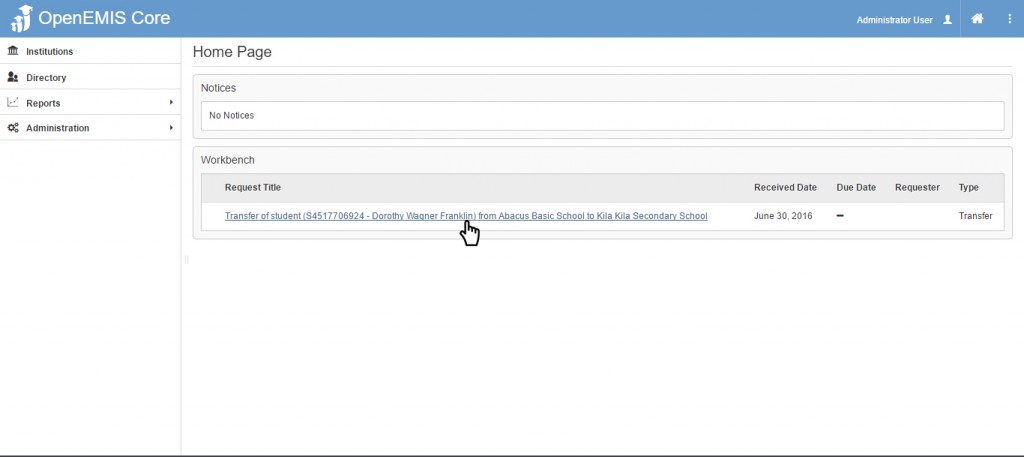
Transfer Request

Transfer Approvals


If he selects “Approve” the request will be saved and the student’ status will change to “Enrolled” in the school accepting the transfer.

Transfer Enrolled

The student’s status will then change to “Transferred” in the school that requested the transfer.


Transfer Students


    • Related Articles

    • Transferring Students

      Schools can manage the transfer of students online through an automated approval workflow between two schools. Below is a video tutorial and step by step guide for this process: Video Player 00:00 00:33 For instance, say a student needs to be ...
    • Students Profile

      Name: OpenEMIS Core Article Name: Students Profile Category/Module: Students,Administration Version: 3.75.15 Date Updated: 13 July 2022 Purpose: This feature allows user 1) To add Students Profile 2) To edit Students Profile 3) To delete Students ...
    • Students Import

      Name: OpenEMIS Core Article Name: Student Import Category/Module: Students, Institutions Tags: Add Students Date Updated: 29 March 2022 Purpose: This Students Import feature allow users to: Import Students in bulk to the Directory. Import Students in ...
    • Students Import

      Name: OpenEMIS Core Article Name: Student Import Category/Module: Students, Institutions Tags: Add Students Date Updated: 29 March 2022 Purpose: This Students Import feature allow users to: Import Students in bulk to the Directory. Import Students in ...
    • Promoting Students

      Name: OpenEMIS Core Article Name: Promote Students Category/Module: Institution Tags: Institution Version: 3.98.12 Date Updated: 6 Feb 2024 Purpose: To promote students to the new academic year by bulk/individually Before performing promotions, the ...